


Apple Ads — 6 Oct 2026
Apple Ads placements: how to build a multi-placement strategy in 2026
 Ivan Žgela

Learn
Introducing Goals: when everything in your account runs to hit a north star target

Black Friday Playbook on Apple Ads Strategy: Defend Your Brand & Capture Demand
Technology
Growth Services
Our AI & Data
Ivan Žgela

Apple Ads placements are the four ad placements on the App Store where advertisers can feature their apps: Today tab, Search tab, search results, and product pages. Each placement connects with users at a different point in the app discovery journey, from active search to exploratory browsing.
In March 2026, Apple Ads added an additional placement in search results. That changes brand defense, organic visibility, and how budgets should flow across placements. Advertisers who treat this as “just more inventory” tend to spend more without getting more.
This guide covers how each placement works, what the expansion changes for brand protection and bidding, and how to choose placements based on what your app actually needs right now.
Apple Ads offers four placements, each tied to a different level of user intent. That intent gap drives wide variation in performance: CR ranges from under 10% on product pages to 40-60% on search results.
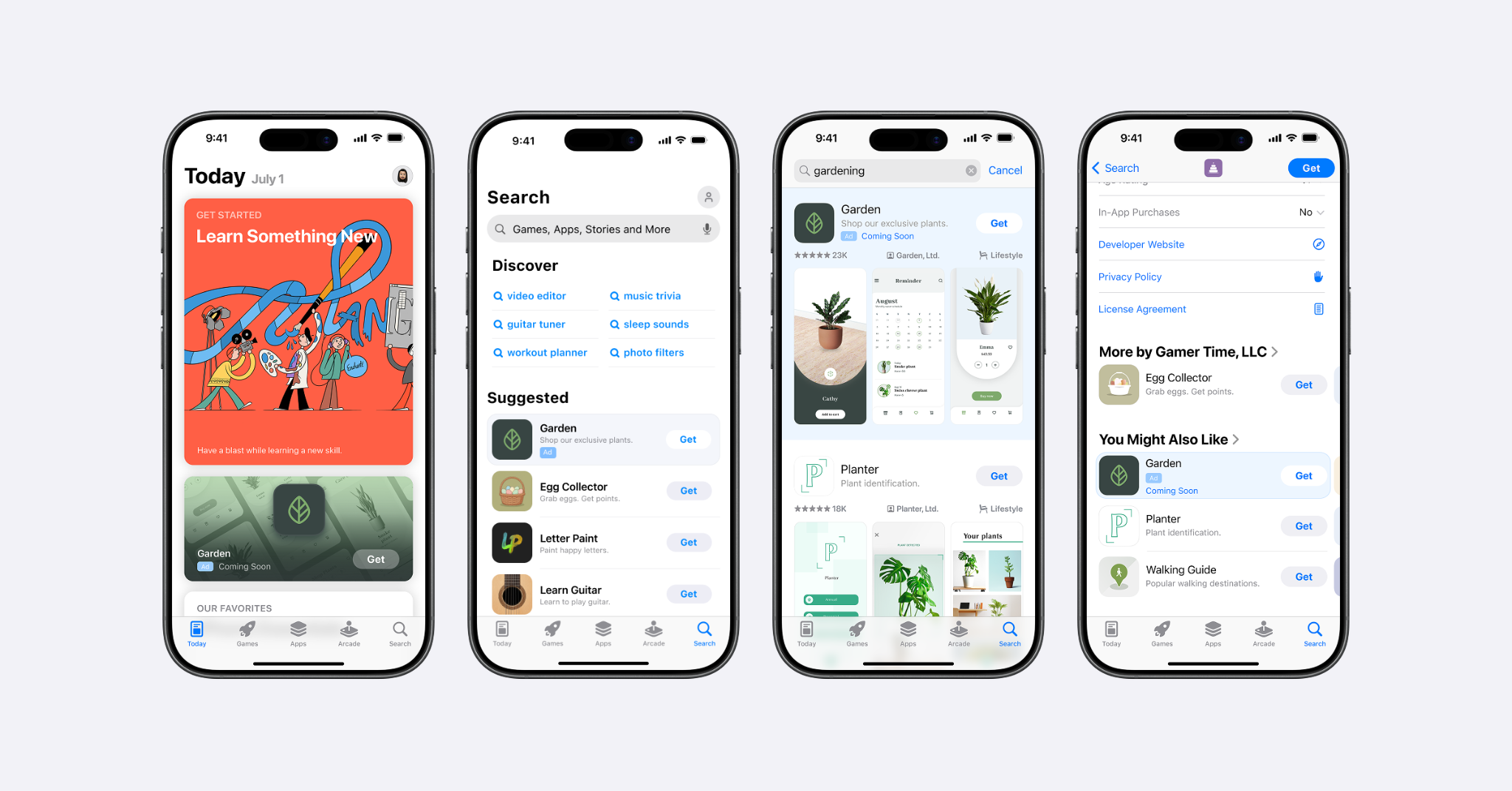
Here are all the ads on the App Store, from left to right: Today tab ads, Search tab ads, search results ads, and product page ads.
Search tab typically generates impressions at a lower cost than search results. In SplitMetrics campaign data, CPM has run as much as 13x lower than search results, though the exact gap varies by market and app category. Ads appear in the Suggested section when a user taps the search icon but before typing.
Search tab ads help advertisers reach people who are looking for new apps to download but have not begun a search yet. From our experience working with clients on this placement, the apps that surface Search tab tend to align with user category interest rather than with specific keywords, which makes Search tab a strong fit for category-level discovery rather than head-term capture. TTR typically runs 0.3-0.7%, with a median of 0.4%, so the metric that matters most for this placement is view-through installs – many Search tab impressions contribute to a download that happens later through search.
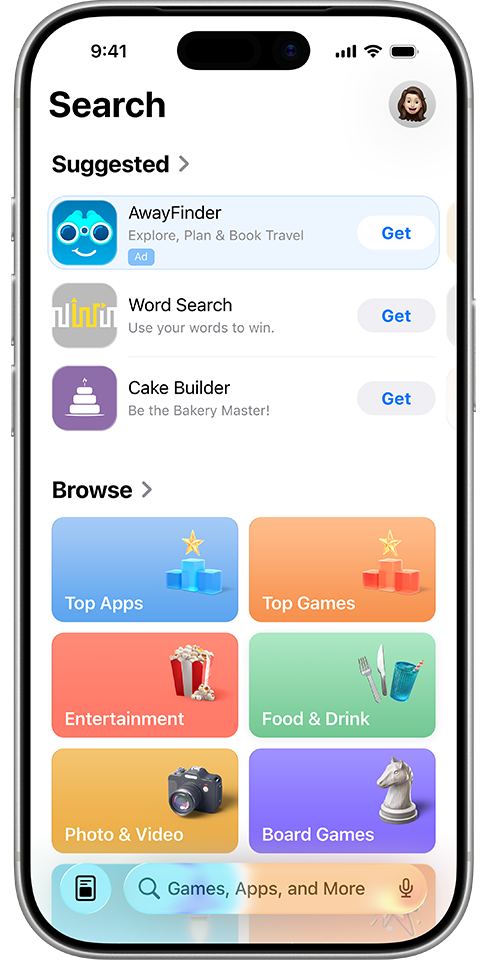
A sample Search tab ad.
Today tab ads appear on the front page of the App Store – one of the most-visited surfaces on the store. TTR typically runs 0.6-1.1% on this placement, with a median of 0.8%, because users are browsing, not searching.
Today tab ads require an approved custom product page as both the creative source and destination. Our custom product pages guide walks through the setup process.
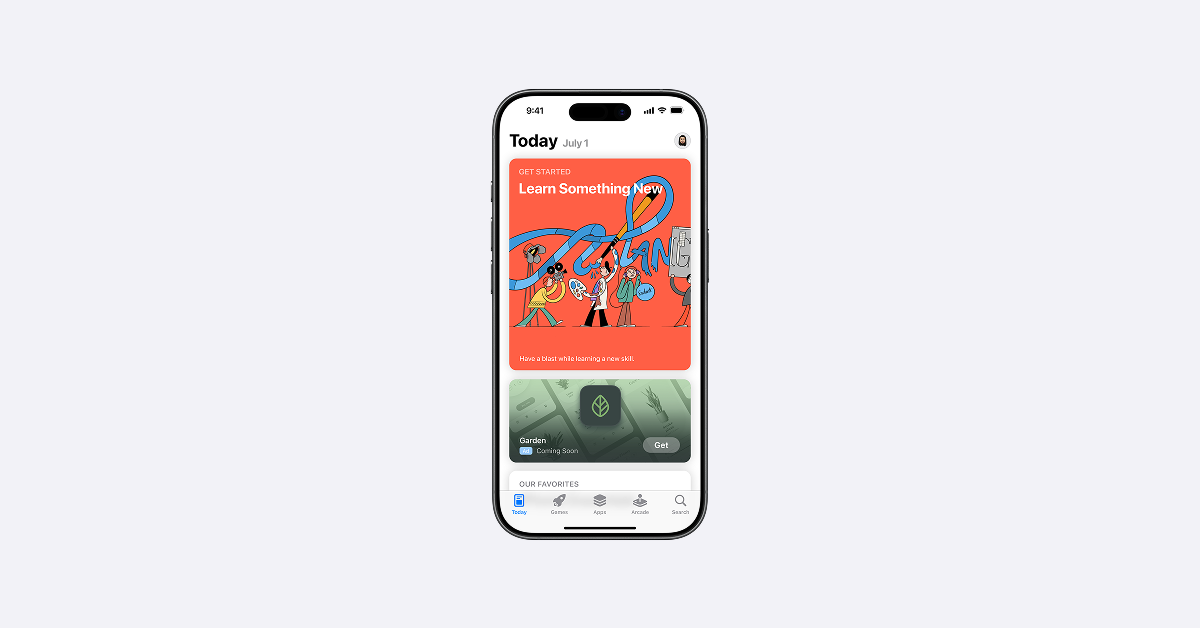
A sample Today tab ad. The Today tab ad is created using assets from the custom product page you select, which animate in the background of your ad and appear in a color derived from your app icon.
Search results ads appear when a user types a query. This is the highest-intent placement on the App Store. As mentioned, CR typically runs 40-60% across SplitMetrics campaign data. Nearly 65% of all App Store downloads happen directly after a search, which is why search results consistently command the largest share of Apple Ads budgets.
Since March 2026, up to two ads can appear per query in search results. Advertisers can use the default product page or a custom product page as the tap destination – the same option exists for Search tab ads. Product page ads use the default product page as the tap destination. Today tab is the only placement that requires a custom product page.
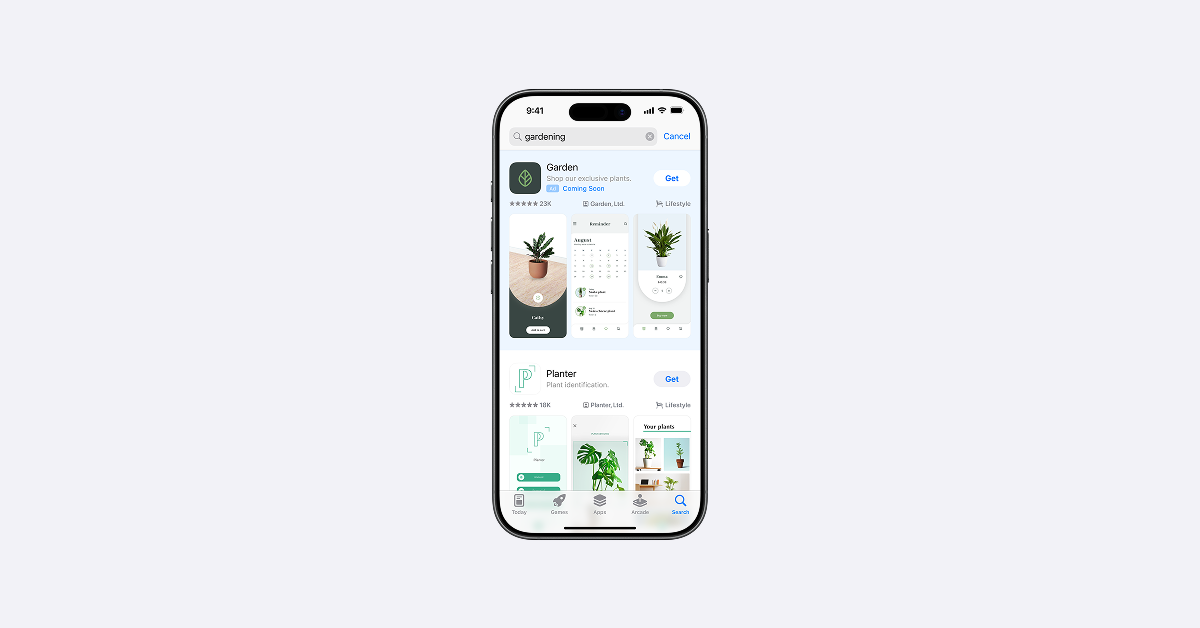
An example of a search results ad.
Product page ads appear under “You Might Also Like” on other apps’ listings. A food delivery app might show on a grocery app’s page. Targeting options include similar apps, all apps, or specific App Store categories. However, you cannot target individual competitor apps directly.
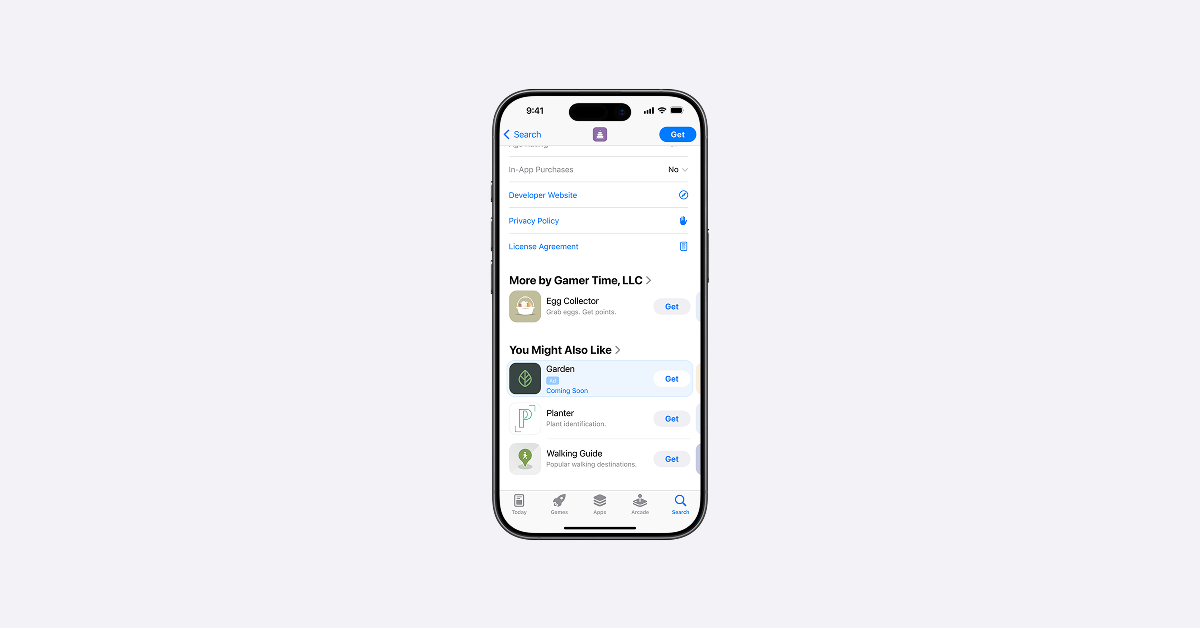
A sample product page ad.
CPTs run lower than search results keyword auctions, but CR often falls below 10%. At SplitMetrics, we see stronger results when targeting complementary categories rather than choosing “similar apps” broadly.
The table below summarizes how each placement compares across intent level, best use case, and typical performance.
| Placement | Intent level | Best for | Typical TTR | Typical CR |
|---|---|---|---|---|
| Today tab | Low (browsing) | Awareness, launch bursts, seasonal pushes | 0.6-1.1% | 10-30% |
| Search tab | Low-mid (pre-search) | Low-cost prospecting, first-to-mind positioning | 0.3-0.7% | Varies widely |
| Search results | High (active search) | Direct acquisition, brand defense | 6-10% | 40-60% |
| Product pages | Mid (researching alternatives) | Competitive conquesting, complementary targeting | Varies | Under 10% |
For a visual perspective on how these placements relate to each other, the interactive chart below maps each one by user intent and typical cost:
Apple Ads expanded search results from one ad position to two. This is the first increase in search ad inventory since the platform launched in 2016.
Previously, a single sponsored result appeared at the top of every search query. Now an additional ad can appear further down the page, alongside organic listings. Apple Ads has indicated this setup may evolve over time. The rollout started in the UK and Japan on March 3, with all Apple Ads markets live by the end of the month. For the full breakdown of placement options, see Ads on the App Store Help: Ad placement options.
Existing search results campaigns qualify for both positions automatically. No new campaign type, no toggle, no new setup.
Advertisers do not choose which placement their ad lands in. Apple Ads determines placement based on relevance and bid, and that decision can vary across queries within the same campaign. Based on what we’ve observed across our client base, bid alone does not guarantee a win – apps that match the search query tend to compete more effectively across both ad positions.
Both ad positions use the same ad creative and billing model. The destination can be the default product page or a custom product page. The pricing model depends on the Apple Ads tier – Apple Ads Advanced runs on cost-per-tap, Apple Ads Basic runs on cost-per-install. Devices need to be on iOS or iPadOS 26.2 or later.
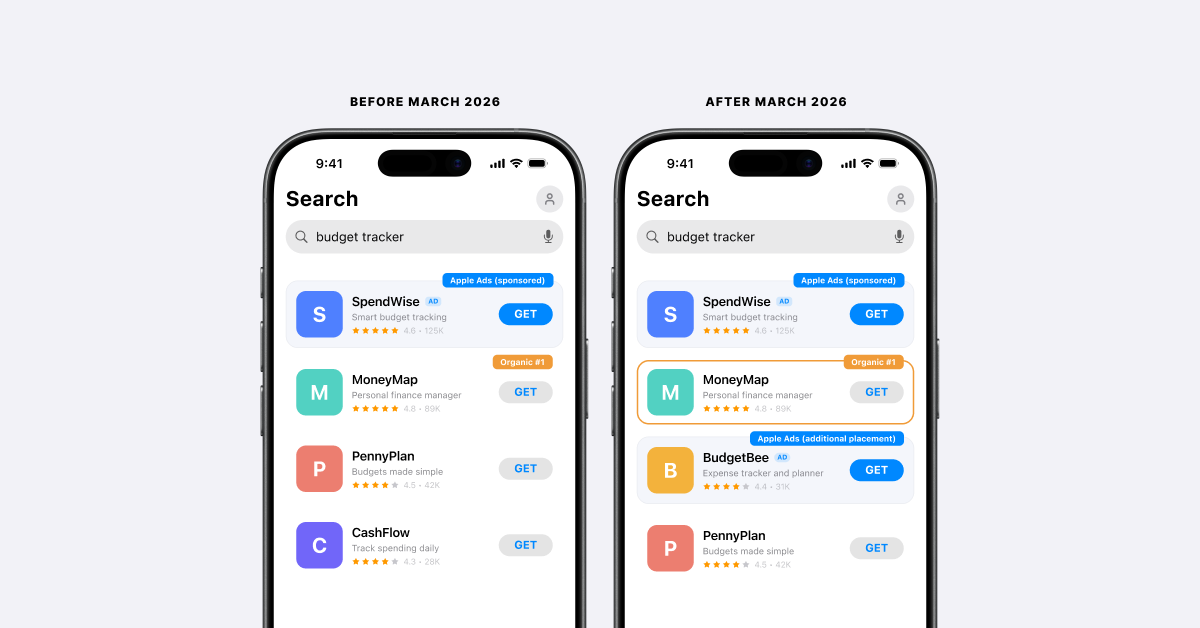
Comparison of search results ad placements before and after March 2026 on the App Store.
More impressions and taps will follow. Early data across SplitMetrics accounts is building, and we’ll share what we learn as the full picture develops through Q2 2026.
One group with an immediate edge: companies running multiple apps. In our experience, a gaming studio with several titles can appear in both the first and additional ad position on a single query. For single-app advertisers, the competitive pressure on high-value keywords increases.
Monitor your performance against pre-expansion baselines. Adjust bids and budgets based on what the data shows, not on projections.
Once ads are served for a query, they stay fixed. If a user scrolls past the results and returns, the same ads appear in the same positions – there is no rotation or refresh. For advertisers using custom product pages, screenshots render in the order selected for that custom product page, same as the top position.
Apple Ads Impression Share reports now include Impression Share (All Ad Positions) and Impression Share (First Ad Position), available in the Apple Ads interface and through the API.
The gap between the two shows how often your ad served in the additional position. Spend, taps, and installs remain aggregated across positions, so plan performance measurement around aggregate search results data.
With two ads now eligible per search query, a competitor can appear on your brand terms even if you hold the top ad position. Brand defense campaigns become more important in this environment.
At SplitMetrics, we recommend keeping brand campaigns active rather than pausing them to test cannibalization.
Even lowering bids is preferable to pausing, as it preserves share of voice reporting while you monitor competitor activity. We’ll cover brand protection strategy for multi-placement accounts in a dedicated article.
Strong app metadata supports both organic visibility and Apple Ads performance. Based on what we’ve observed across our client base, apps with well-optimized titles, subtitles, and keyword fields tend to compete more effectively in both organic ranking and paid search results – the same metadata work compounds across both surfaces.
The March 2026 placement update raises the upside. With an additional Apple Ads placement now serving in search results, app teams have more reason than ever to keep metadata sharp.
From our experience working with clients on the channel, strong metadata is the foundation that all four Apple Ads placements build on, and it pays back in both organic and paid visibility on the same query.
The additional Apple Ads placement gives advertisers two opportunities to reach searchers in the same query. App teams running in-app events can amplify their organic listing at the same time.
When an in-app event is active, the App Store displays a large event card with the event’s image or video directly in search results – a meaningfully larger format than the standard organic row. Coordinating in-app events with active Apple Ads campaigns gives apps the largest combined visual footprint on a search query.
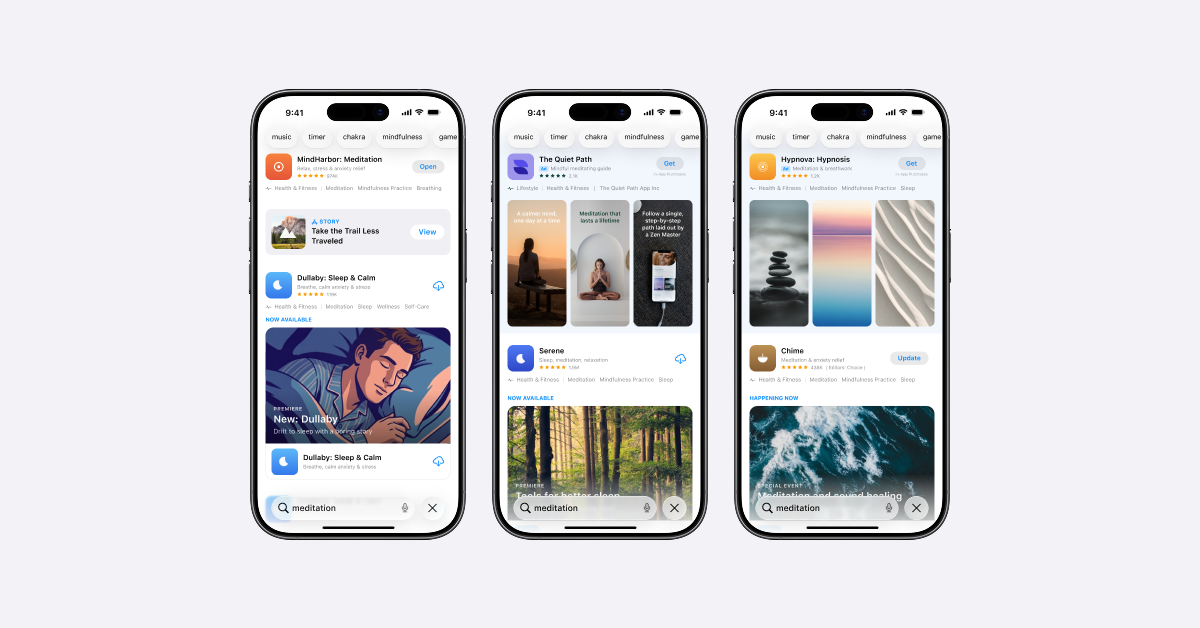
How in-app events can appear on the App Store
The effect depends on who’s searching. Users who already have the app installed see the in-app event card instead of a small “Open” row. People who downloaded but stopped using the app see the event card as a re-engagement prompt. New users who haven’t installed the app still see the standard screenshots. This means in-app events primarily defend and re-engage your existing user base in search.
Apps that maintain a regular cadence of in-app events effectively turn their organic listing into a display-sized unit. Coordinate in-app event timing with your Apple Ads campaign calendar – run events during periods of heavy competitor bidding on your brand terms, and refresh creatives between static banners and video to avoid ad fatigue on the organic side.
Search results campaigns generate real-time data on which keywords drive taps and conversions in Apple Ads. Based on what we’ve observed across SplitMetrics-managed accounts, this data is one of the most useful inputs for ASO keyword priorities – when a keyword performs strongly in paid, our team often treats that as a signal worth testing in organic metadata.
The same input flows the other direction. From our experience working with clients on the channel, when an app ranks well organically for a term and is also running ads on that term, account managers monitor combined performance to decide whether to maintain coverage on both surfaces or reallocate budget to terms with weaker organic visibility.
SplitMetrics Acquire and App Radar’s keyword research make this comparison possible across both channels. For a deeper look at this relationship, see our guide on Apple Ads and ASO synergy.
Most advertisers start with search results and stay there. That makes sense: it’s the highest-intent placement and where the bulk of Apple Ads budgets belong.
SplitMetrics market intelligence data shows roughly 80% of spend concentrated on search results with Exact Match keywords across well-performing accounts. Expanding to other placements should follow a specific need. Here are the four most common situations where adding a placement makes sense.
Every app category has a ceiling on relevant search queries. Once you’re covering brand terms, top generics, and competitor names with well-optimized campaigns, pushing more budget into search results can stop producing proportional results.
Search tab reaches users before they type, at a fraction of the cost-per-impression. At SplitMetrics, we’ve seen Search tab perform at brand-campaign levels for well-known apps in markets where their brand is already established. Travel apps and finance apps with strong brand recognition tend to see the best results from this placement.
Today tab can generate the download velocity that supports organic ranking. It’s a good fit for launches, seasonal moments, and big feature updates.
Plan the custom product page approval timeline early, not the week before launch. Gaming studios use this placement for new title launches and seasonal content drops. Finance apps see results around tax season and end-of-year planning windows.
Some categories have brand terms running $4-5+ per tap. Product page ads offer a cheaper path to those users by appearing in “You Might Also Like” on competitor listings. Conversion rate tends to be lower here: users browsing another app’s listing are typically further along in evaluating that specific app.
Targeting complementary App Store categories instead of direct competitors tends to improve results. Real-money gaming and finance apps, where user LTV is high enough to absorb lower conversion rates, often find product pages worth the test as part of a broader brand offense strategy.
Across the accounts we manage, we have seen the same publisher appear in both search results ad positions on a single query. A gaming company with several titles in the same genre could, in our experience, show up in both placements on a query like “tower defense games.” Add a strong organic ranking and that is three visible positions for one portfolio.
Here’s how each scenario maps to a starting placement and the metrics worth watching:
| Your situation | Start here | Key metric to watch |
|---|---|---|
| Keyword volume maxed out | Search tab | LTV of early-intercept users vs. search-driven users |
| Launch or seasonal push | Today tab | Custom product page approval lead time, creative fatigue |
| Competitor terms too expensive | Product pages | CR by targeting type (direct vs. complementary) |
| Multi-app portfolio | Search results (both ad positions) + ASO | Share of voice across positions |
| Starting out or limited budget | Search results (Maximize Conversions, then Exact Match) | CR, CPA, brand keyword cannibalization |
Benchmarks can guide expectations, not targets. Every app category, market, and season shifts the numbers. The ranges below come from SplitMetrics campaign data and our benchmark dashboard, which is updated with live data. For a full breakdown of Apple Ads costs and benchmarks, see our dedicated analysis. What matters more than matching a benchmark is understanding why placements perform differently and how to use that knowledge operationally.
No, the same app can’t appear in both search results ad positions. Up to two ads can appear per query, but they must be from different apps. Across the accounts we manage, we have seen the same publisher hold both positions with different apps from their portfolio – for example, a gaming studio with multiple titles in the same genre appearing twice on a single query.
SplitMetrics experts observe that there are currently no specific serving rules governing how multiple apps from the same developer are distributed across the two search positions. Instead, standard auction mechanics apply, with placement determined by relevance and bid. For app marketers managing multiple apps within the same category, this is an important area to keep an eye on as the ad experience evolves.
The new reporting will partly show it. Apple Ads Impression Share reports now include two position-level metrics: Impression Share (All Ad Positions) and Impression Share (First Ad Position), along with Rank for each. Both are available in predefined Impression Share reports and on the Recommendations page, and through the Apple Ads API. The difference between the two tells you how often your ad served in the additional position. Performance metrics such as spend, taps, and installs remain aggregated across search results positions, so plan conversion and CPA analysis around aggregate search results data.
No, Today tab ads must use a custom product page as both the creative source and the destination. There is no default option for this placement. The custom product page must be approved before the campaign can go live.
You should run new placements for at least four weeks. User journeys on the App Store are rarely linear – someone may see a Today tab ad, search later, and download through a different touchpoint. Based on what we’ve observed across SplitMetrics-managed accounts, Apple Ads campaigns also benefit from a few weeks of running time before the data signal stabilizes enough to evaluate. Cutting placements before that window is up tends to drop placements that had not yet had a chance to contribute.
Yes, Personalized Ads settings affect placement reach. 78% of App Store search volume on iOS 17 and later comes from devices with Personalized Ads turned off. If you narrow audience targeting settings, users with Personalized Ads disabled won’t see your ads. For most advertisers, targeting all eligible users maximizes reach across every placement.
Apple Ads tracks installs from users who saw your ad but didn’t tap it. These are called view-through installs, and they’re counted within one day of the ad impression. Today tab and Search tab generate high impression volumes with lower direct tap rates, so view-through installs often capture their real contribution better than tap-based metrics. Evaluate these placements on total install lift at the app level, not on individual placement CR alone.
Budget distribution depends on the advertiser’s stage and maturity. Newer advertisers often start with search results using Maximize Conversions and Search Match to build keyword data quickly, then move to Manage Bids with Exact Match keywords once they know which terms convert. Mature advertisers typically keep the largest share on search results because intent is highest and performance data is most reliable. In both cases, treat other placements as test allocations with separate daily budgets, run each test for at least four weeks before evaluating, and scale budget toward placements that prove positive ROI for your specific app and category.
There is no universal starting budget per placement. The right amount depends on your app category, market, and overall Apple Ads spend. The principle that holds across accounts: search results should carry the largest share of budget. Allocate enough to additional placements to generate statistically meaningful data within your test window, but don’t split the budget so thin that no placement gets enough volume to optimize properly.
Start with search results. Optimize keyword structure, bid rules, and CPA targets before expanding. Once search results performance is stable, add Search tab for low-cost impression volume or product pages for competitive positioning, depending on your goal. Today tab works best for specific moments like launches or seasonal campaigns. Adding all four placements at once without a reason for each one makes performance harder to measure and budgets harder to control.
Yes, you can automate bid management across multiple placements. Managing bids manually across four placements and multiple campaigns can be challenging. Apple Ads automation through SplitMetrics Acquire lets you set rules for each placement type: Share of Voice-based rules for brand defense, CPA-based rules for generic keywords, volume-based rules for discovery placements.
See how other teams have used multiple Apple Ads placements to grow their apps:
Each Apple Ads placement reaches users at a different point in their App Store journey. Search results drive acquisition; Today tab and Search tab extend reach when there’s a clear reason. Product pages open a path to competitor audiences when keyword costs are prohibitive. The March 2026 Apple Ads expansion added an additional placement in search results and made two things more urgent: brand defense and ASO. Monitor your data as it builds, expand placements with purpose, and keep metadata competitive in both the auction and organic results.
*Footnote: All data referenced in this article is sourced from SplitMetrics Market Intelligence.