Apple Ads and ASO: How Paid Search Data Improves Organic Rankings
 Ivan Žgela
 Ivan Žgela

Apple Ads and App Store Optimization (ASO) are the paid and organic sides of search on the App Store. Apple Ads places your app at the top of search results for the keywords you bid on, while ASO earns organic rankings through metadata, creatives, ratings and download velocity.
Both channels compete for the same users on the same search results page, so the keyword and creative data from one channel is directly useful to the other. If you’re new to the paid side, our Apple Ads guide covers the basics.
Running Apple Ads and ASO as separate workstreams means the ASO team picks keywords without conversion data, and the Apple Ads team bids without knowing where the app already ranks organically. By the end of this guide, you’ll know how to use Apple Ads data to choose keywords and creatives for ASO.
You’ll also know how to measure the organic effect and adjust your bids once organic rankings improve.
Apple Ads and ASO share the same starting point and the same goal. The starting point is the keyword a user types into search on the App Store. The goal is the install from that search results page, where your ad and your organic listing can appear together.
Apple Ads and ASO feed each other in both directions:
| What Apple Ads gives ASO | What ASO gives Apple Ads |
|---|---|
| Search terms from real queries, with installs and conversion rate for each one | A higher conversion rate from stronger creatives, which lowers cost per tap and cost per acquisition |
| Search popularity and competition signals for every keyword | Keyword relevance from your metadata, which helps your ads qualify for the right searches |
| Creative test results from custom product pages | Ratings and reviews that raise conversion on paid and organic traffic |
| Installs that add download velocity on your target keywords | Organic positions that lower how much you need to bid on some keywords |
The last row of the table, the effect of paid installs on organic rankings, is the question the next section answers.
In SplitMetrics’ experience, Apple Ads can improve organic rankings indirectly. The App Store ranking algorithm is not public, so this effect comes from campaign results rather than a confirmed ranking factor.
Installs from search results ads add download volume and conversions on the keywords you bid on, and ASO practitioners associate both download velocity and conversion rate with higher rankings.
SplitMetrics case studies show what happens when both channels work on the same keywords:
These results come from SplitMetrics client work in 2022 and 2023, so read them as examples rather than a guaranteed uplift. Paid installs alone are not a ranking strategy either. In every case above, the keywords were also part of the app’s metadata work, and that pairing is what the workflow below covers.
App Store Connect reports downloads by source type, while Apple Ads reports impressions, taps, installs and conversion rate for every keyword and search term you bid on. SplitMetrics recommends the 5 steps below to move that keyword data into your metadata and product page, and then check whether organic rankings moved.
The Search Terms tab in Apple Ads shows the actual search terms that matched your ads through broad match keywords and Search Match.
In the campaign structure SplitMetrics uses, most of these search terms come from a Discovery campaign. That campaign runs broad match and Search Match with your exact match keywords added as negatives, so it only surfaces terms you don’t bid on yet. Each search term comes with impressions, taps, installs and spend, so you can see which real queries turn into installs.

Look at 30 days of data or more, so lower-volume terms collect enough taps to judge. To protect user privacy, Apple Ads shows search terms with fewer than 10 impressions a day as “Low Volume”, so some long-tail queries won’t appear one by one.
The Search Terms tab shows what users actually typed, which is often different from the keywords you bid on. A broad match keyword like “photo editor” can bring in dozens of different search terms, and each one converts differently.
Sort the search terms by installs and conversion rate, then remove search terms that can’t or shouldn’t go into your metadata:
Post-install results such as trial starts and purchases aren’t available per search term. The attribution data Apple Ads passes to your MMP includes the campaign, ad group, keyword and ad but leaves out the search term. Installs that come through Search Match carry no keyword at all.
My successful projects with ASO teams followed one simple flow: the team had already done the basic optimization and came to me to find stronger keywords for the next metadata update. Search popularity shows how often people search, but not whether they download, so we tested those keywords on Apple Ads first and added to the metadata only the ones that converted well.

The search terms that remain, convert well and aren’t in your metadata yet are your ASO keyword candidates. Add each candidate as an exact match keyword in one of your performance campaigns, so its post-install results show up in your MMP, and give it 30 days or more before step 2.
Once a candidate runs as an exact match keyword, Apple Ads and your MMP report its full funnel: impressions, taps, installs and the post-install events you track. Where the funnel drops tells you which part of your ASO to work on, and whether the keyword belongs in your metadata at all.
| What you see in Apple Ads | What it usually means | Where to act |
|---|---|---|
| Many impressions, low tap-through rate | Your search result doesn’t match what the user searched for | App name and subtitle wording, icon, first 3 screenshots |
| Good tap-through rate, low conversion rate | The product page doesn’t deliver on the search | Screenshots, app preview video or a custom product page for that keyword |
| Good conversion rate, low activation after install | The onboarding doesn’t match what the user expected from the search | Fix the onboarding first and keep the term out of your metadata for now |
| Good conversion rate, weak trial or purchase rate | The paywall, pricing or product fit doesn’t match this search intent | Keep the term in Apple Ads only, or add it as a negative keyword |
| Strong results after install, low organic rank | Your metadata doesn’t cover the term yet | The app name or subtitle if search popularity is high, the keyword field if it’s low |
| Strong results after install, organic rank in the top 3 | Paid and organic installs might overlap on this term | Run a holdout or bid reduction test before you keep spending on it |
The SplitMetrics Apple Ads benchmarks give you a reference point. Across the top 15 categories in 2025, search results ads averaged a 9.7% tap-through rate and a 66.2% conversion rate. Compare each keyword with the average for your own category before you call its tap-through or conversion rate low.
Apple Ads shows search popularity for each keyword on a scale from 1 to 5, and it also has a finer 1-100 score, both overall and within your app’s genre. SplitMetrics Acquire shows search popularity on a finer scale as well, with 5 as the lowest value. The suggested bid hints at how many advertisers compete for a keyword.
In SplitMetrics’ experience, a keyword with heavy competition in Apple Ads is often hard to rank for organically too, so it might need both channels working on it at the same time.
Here is how the table works on one keyword. A fitness app found “interval running coach” in the Search Terms tab of its Discovery campaign and added it as an exact match keyword. The numbers below cover its first 30 days as a keyword and are an illustrative example rather than client data.
| Funnel stage for the exact match keyword “interval running coach” | Result |
|---|---|
| Impressions | 5,000 |
| Taps | 550 (11% tap-through rate) |
| Downloads | 385 (70% conversion rate) |
| Trial starts | 96 (25% of downloads) |
| Paid subscriptions | 38 (40% of trial starts) |
| Current organic rank | #34 |
The tap-through and conversion rates sit above the 2025 benchmark averages, so the search result and the product page match what users searched for. The trial and subscription numbers show that users from this keyword stay and pay.
With an organic rank of #34, the app’s metadata doesn’t cover the term yet, which makes “interval running coach” a strong candidate for the subtitle or the keyword field. If downloads had been strong and trial starts low, the table would point to the onboarding or the paywall, and the term would stay out of the metadata for now.
The App Store indexes keywords from 3 metadata fields: the app name (30 characters), the subtitle (30 characters) and the hidden keyword field (100 characters). Put the keywords with the best mix of popularity and conversion in the app name and subtitle, and use the keyword field for the rest.
SplitMetrics recommends keeping your bids on those keywords while the new metadata gets indexed. The paid installs keep supporting the keyword while its organic position settles. Write down the date of every metadata update, because step 5 compares rankings before and after it.
Custom product pages let you show different screenshots, app previews and promotional text to different audiences. You can publish up to 70 custom product pages per app. In Apple Ads, you create ad variations from custom product pages, so each search results ad group can show the custom product page that fits its keyword theme.
Custom product pages make Apple Ads a testing ground for your default product page. Build a custom product page around one feature or message, send traffic to it from the keywords that match, and compare its conversion rate with the default page on the same keywords.
When a custom product page keeps converting better than the default page, its screenshots or message become a candidate for the default page itself.
Custom product pages can also appear in organic search results when you assign keywords to them in App Store Connect. The keywords you assign come from your latest approved app version, so a keyword has to be in your metadata first. A page that wins in Apple Ads can then serve organic searches for the same keywords.
For a controlled test on the default page itself, product page optimization in App Store Connect runs A/B tests on organic traffic.
Total organic installs move for many reasons, including featuring, seasonality and app updates. That’s why the organic effect of Apple Ads and new metadata is easier to read at keyword level. Track these numbers for each target keyword:
The last point needs attention. In App Store Connect, the App Store Search source type includes downloads from ads in search results, so that number mixes paid and organic installs. Subtract the installs Apple Ads reports for the same period to get an estimate of organic search downloads. Without that step, a rise in Apple Ads spend can look like organic growth.
In SplitMetrics’ experience, keyword ranking changes after a metadata update usually take 4-8 weeks to show, while creative changes usually show within 2-4 weeks. Compare periods of the same length before and after each change.
When your app ranks organically for a keyword and also runs an ad on it, the app can appear twice on one search results page. It shows once in an ad and once in the organic results. Since March 2026, ads in search results can appear in more than one position on the page, so organic results can sit further down than before.
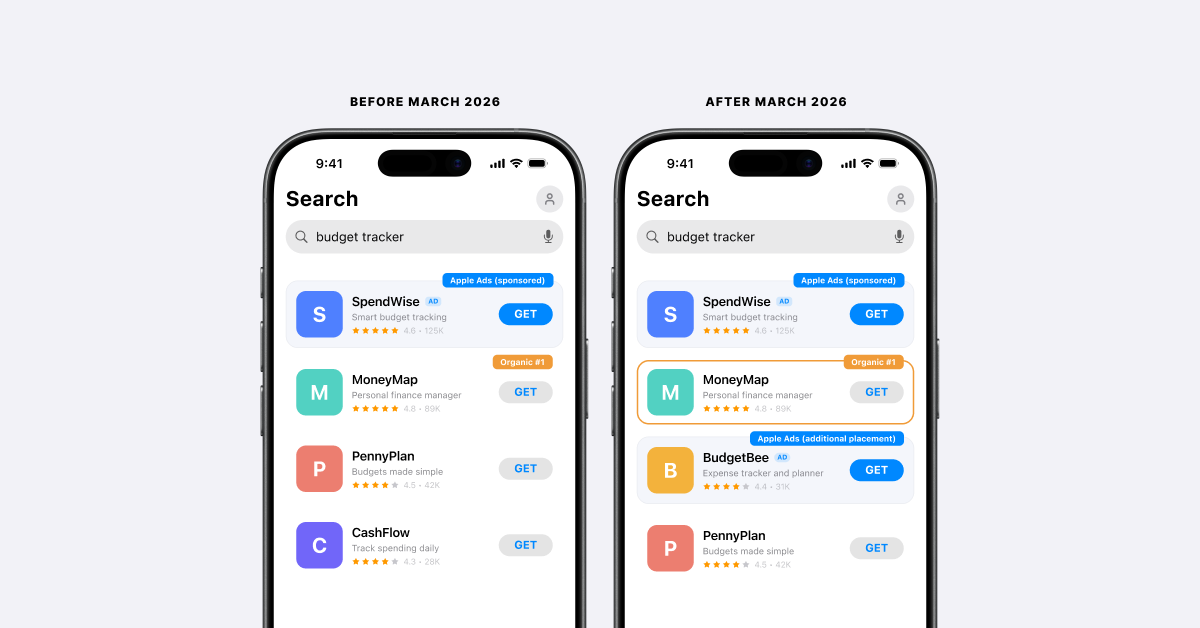
App marketers have a few ways to use that position:
Lowering Apple Ads bids on a keyword where your app ranks first organically can cut cost, and it can also hand the ad slot to a competitor. The right call depends on whether competitors bid on that keyword and how many of your paid installs would have come through the organic listing anyway.
SplitMetrics recommends a holdout test before you cut spend for good. Lower the bid or pause the keyword for 30 days, and compare total installs from that keyword, paid and organic together, with the 30 days before.
If total installs stay flat, most of the paid installs were users who would have found your organic listing, and you can move that budget to keywords where you don’t rank yet. If total installs drop, the ad was bringing in additional users and the bid stays. Judge both outcomes against your own CPA or cost per goal target.
Our guide to Apple Ads branded keywords covers the same test for brand terms.
Apple Ads can promote an app while it is still available for pre-order on the App Store. The app downloads automatically for users who pre-ordered it on release day, which concentrates installs on launch day and gives the app early download velocity. Maximize Conversions is designed for campaigns after launch, so pre-order campaigns run with manual bids.
Run pre-order campaigns on the keywords in your launch metadata, so launch-day installs come from the searches you want the app to rank for.
Apple Ads and ASO share several metrics, and some of them only make sense when you read them side by side. The guide to Apple Ads metrics explains each paid metric in more detail.
| Metric | Where it comes from | What it tells you |
|---|---|---|
| Organic rank per keyword | An ASO tool or SplitMetrics Acquire | Whether paid installs and metadata changes move your organic position |
| App Store Search downloads minus Apple Ads installs | App Store Connect and Apple Ads | An estimate of organic search downloads, the total organic result of both channels |
| Search popularity | Apple Ads (1-5 scale and 1-100 score) or SplitMetrics Acquire | How much traffic a keyword can bring at the top positions |
| Tap-through rate (TTR) | Apple Ads | How relevant users find your app and creatives for a search |
| Conversion rate (CR) | Apple Ads and App Store Connect | How well your product page matches what the user searched for |
| Cost per tap (CPT) and cost per acquisition (CPA) | Apple Ads | What the paid side costs for each keyword |
| Impression Share | Apple Ads | How often your ad shows for a keyword compared with competitors |

SplitMetrics Acquire shows the organic rank of each keyword next to its Apple Ads metrics, so you can run this workflow from one report.
SplitMetrics is an Apple Ads Partner. Explore SplitMetrics Acquire
You can find new ASO keywords with Apple Ads in the Search Terms tab, which shows the real queries that matched your broad match keywords and Search Match. Add the terms that convert well as exact match keywords and read their post-install results for 30 days or more. Then move the ones that pay off into your app name, subtitle or keyword field.
Paid and organic installs overlap when users who would have tapped your organic listing tap your search results ad instead. The overlap is usually largest on brand keywords and on keywords where your app already ranks first. Compare organic installs in the 30 days before a campaign starts with the 30 days while it runs. In SplitMetrics’ experience, an organic drop of 5-10% or more points to overlap, and a 30-day holdout on the keyword shows how large it is.
Organic rank changes from Apple Ads and new metadata usually take 4-8 weeks to show, in SplitMetrics’ experience, while creative changes usually show within 2-4 weeks. Compare periods of the same length before and after each change, and account for featuring, seasonality and app updates, which also move organic installs.
Custom product pages can appear in organic search results on the App Store when you assign keywords to them in App Store Connect. Without assigned keywords, users reach a custom product page through its URL or through an Apple Ads ad variation.
SplitMetrics recommends setting up the product page and core metadata before scaling Apple Ads. Search results ads show your app name, icon, subtitle and product page assets, and your product page converts the taps. After that, ASO and Apple Ads improve together: Apple Ads data informs your ASO choices, and stronger ASO lowers your Apple Ads costs.