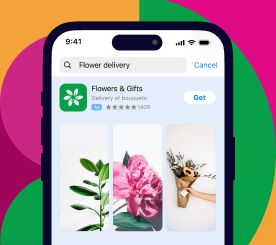
, ,  — 18 Sep 2026

App Store Creative Assets: How the New App Store Feature Impacts App Visibility

Ivan Žgela

App Store creative assets are a new category of images and videos on the App Store. They cover brand messaging, seasonal offerings and new content, and they arrive with iOS 27 and iPadOS 27 in the fall of 2026.

Until now, everything on an App Store product page had to be anchored to the interface. The App Review Guidelines state that screenshots should show the app in use, and app previews may only use screen captures of the app itself. Creative assets are not bound by either guideline, so a product page can now contain brand and promotional creative that never shows the app interface at all.

This guide covers what is changing and what it means for your app:

  • what creative assets are
  • where they appear
  • what changes for the screenshots and app previews already on your page
  • how approval works
  • what the guidelines allow and what they don’t

What are App Store creative assets?

App Store creative assets are a new category of images and videos that cover brand, seasonal offerings and new app content. Creative assets appear across the App Store and inside Apple Ads campaigns, and they go beyond showing an app in use, which is what screenshots and app previews already do.
App Store Creative Assets: How the New App Store Feature Impacts App Visibility

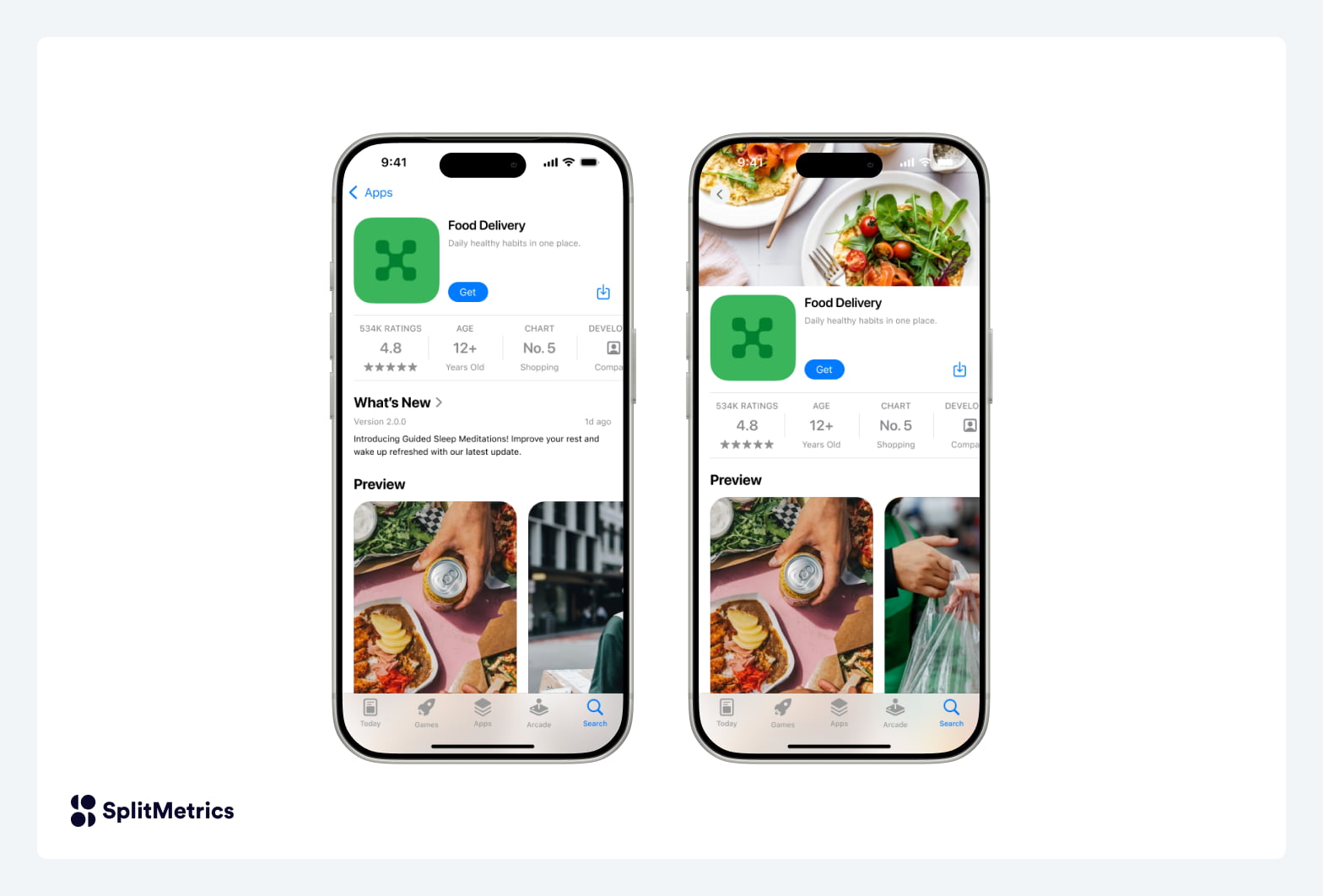
By contrast, traditional visual assets on the App Store need to follow specific guidelines:

Creative assets complement those existing assets. Screenshots and app previews stay exactly where they are, and creative assets give you room to lead with brand, a seasonal offering, or new content in the app, both on the App Store and inside Apple Ads campaigns.

Where do App Store creative assets appear?

There are several placements where creative assets can appear.

  • The product page header is the first visual element on an App Store product page, and it accepts an image or a video.
  • Search results carry creative assets on the App Store and in the Apple Games app.
  • Apple Ads campaigns can use creative assets on the Today tab and in search results.

Creative assets can also be used across App Store features you already run. Each custom product page can carry its own header, product page optimization lets you test alternative header visuals against your current page, and in-app events can use them as well.

Supplying a creative asset for App Store search results is optional. If you don’t supply one, the media already eligible to appear there shows instead, which means in-app events, app previews and screenshots.

Creative assets, Asset Library and the product page preview tool all arrive in the fall of 2026. The recommendation is to start creating images and videos now, so they are ready to submit once creative assets go live.

What is a product page header?

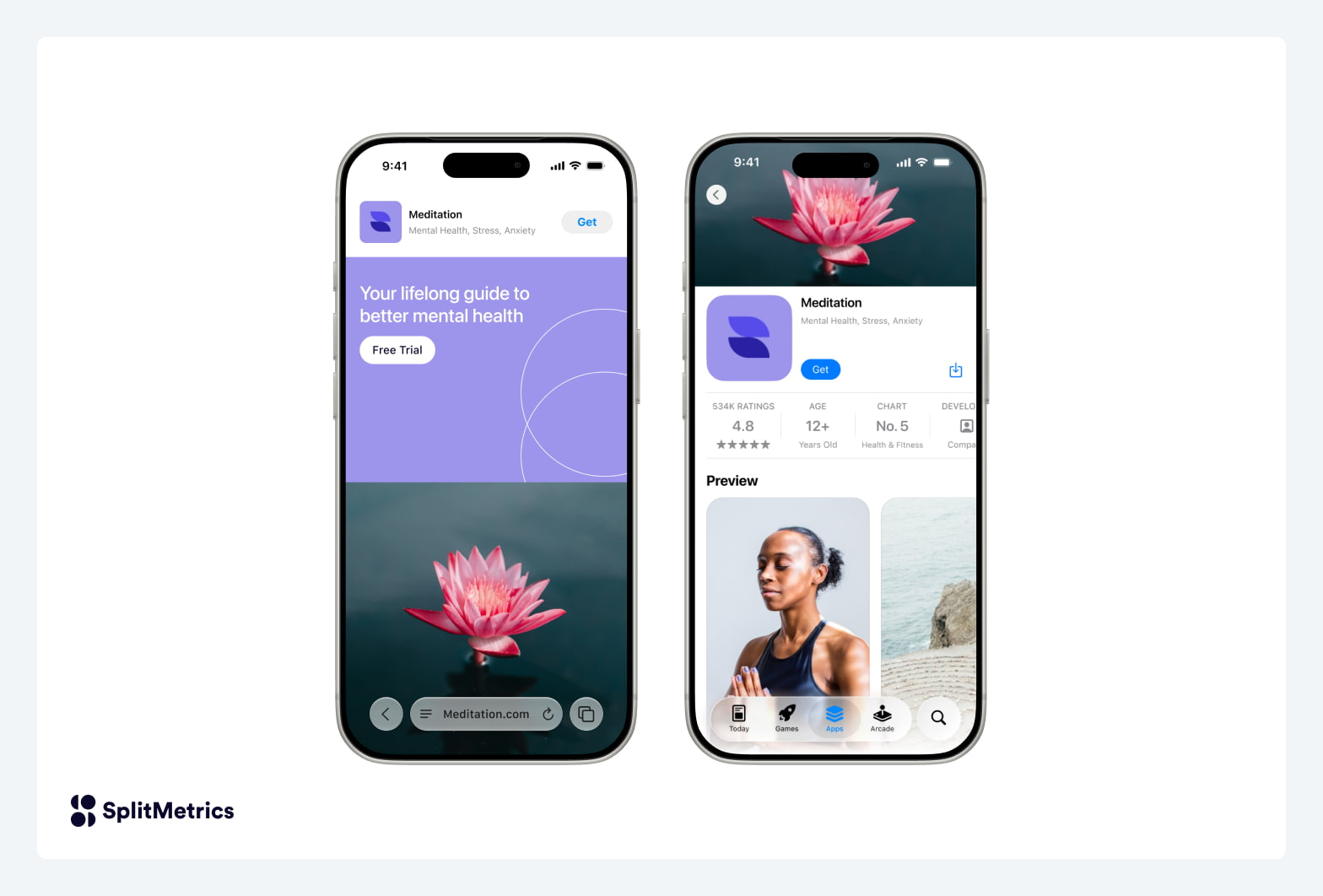
A product page header is the first visual element someone sees when they land on an App Store product page. The header sits right at the top of the page and forms the initial visual impression alongside the app icon, the title and the ratings, while the screenshots appear in their own dedicated section below. It accepts either an image or a video.

The App Store describes the header, the app icon and the screenshots as working together to give someone a clearer picture of what an app does.
App Store Creative Assets: How the New App Store Feature Impacts App Visibility

Custom product pages are alternate versions of an App Store product page, each with its own URL, used to match what someone sees to where they came from. The App Store allows up to 70 per app, and each one will be able to carry its own header. An app running pages for its brand terms, its competitors and its category keywords can open each of them with a different image.

Creative assets let app marketers be more relevant to their audiences, across both organic and paid placements. The header sets up the page and the screenshots carry the proof. In our experience the two work best when they are briefed together rather than produced by separate teams.

What do creative assets do in App Store search results?

In App Store search results, a creative asset gives you a dedicated visual for that position, alongside the app previews and screenshots already eligible to appear there. Supplying one is optional, and choosing to supply one changes what you ask the search results position to do.

Someone scrolling a set of App Store search results is trying to understand the types of apps presented, whether those apps look relevant to what they typed, and whether to look closer.

A search results asset speaks to all three. The product page header and the screenshots then have room to work on the decision to install.

App Store search results can also lead straight to an install without a product page visit, so the search results asset can move both page views and downloads.

The way we plan these at SplitMetrics, the two assets work in sequence. The search results asset wins attention and establishes relevance quickly. The product page then backs up the relevance claim the search results asset made and gives the person a reason to install.

What creative assets change for Apple Ads

Apple Ads creative has come from what already sits on your App Store product page. Today tab ads are generated from your product page content, and search results ads display the screenshots and app previews from your product page, or from whichever custom product page the ad points at. Creative assets change that, because you design the ad creative yourself for Today tab and search results campaigns.

Every creative asset approved for your account becomes available to choose from inside Apple Ads. Advertisers already align cross-channel brand visuals with Apple Ads through custom product pages, and creative assets open a second route for that: creatives built for other channels can carry across once they pass review.

In Apple Ads, advertisers can select their tap destination (default product page or custom product page), add deep links, and assign localized creative assets to their campaigns.

Ad creative will come with its own review, separate from App Store Connect, against Apple Ads guidelines to be published at a later date.

What has been published on specifications

Specifications split by where the asset runs, so treat them as two separate sets.

Product page headers come with design templates rather than fixed numbers:

SpecificationValue
Design templatesPublished for Figma, Photoshop and Pixelmator
LoopingSeamless
AudioOptional brand audio, muted by default
Aspect ratio and durationNot specified for store-side headers

Apple Ads search results campaigns come with numbers:

SpecificationValue
Aspect ratio3:2 for images and video
Video length5 to 30 seconds
PlaybackMuted
TextEmbedded text allowed and localizable by country or region

Dimensions for the organic App Store search results asset have not been published yet.

What changes about your existing App Store assets?

Creative assets take nothing away. Screenshots, app previews and the app icon all stay where they are, following the existing guidelines and best practices. What changes is what some of them can do, and how quickly any of it can be updated.

Screenshots go back to demonstrating the product

App screenshots have always been doing two jobs at once. They demonstrate the app, and they carry the awards, ratings badges and call-to-action lines that had nowhere else to live.

The App Store asset best practices say to “avoid using the entire asset to highlight general accolades or call-to-action statements”, and to keep the focus on the core user experience.

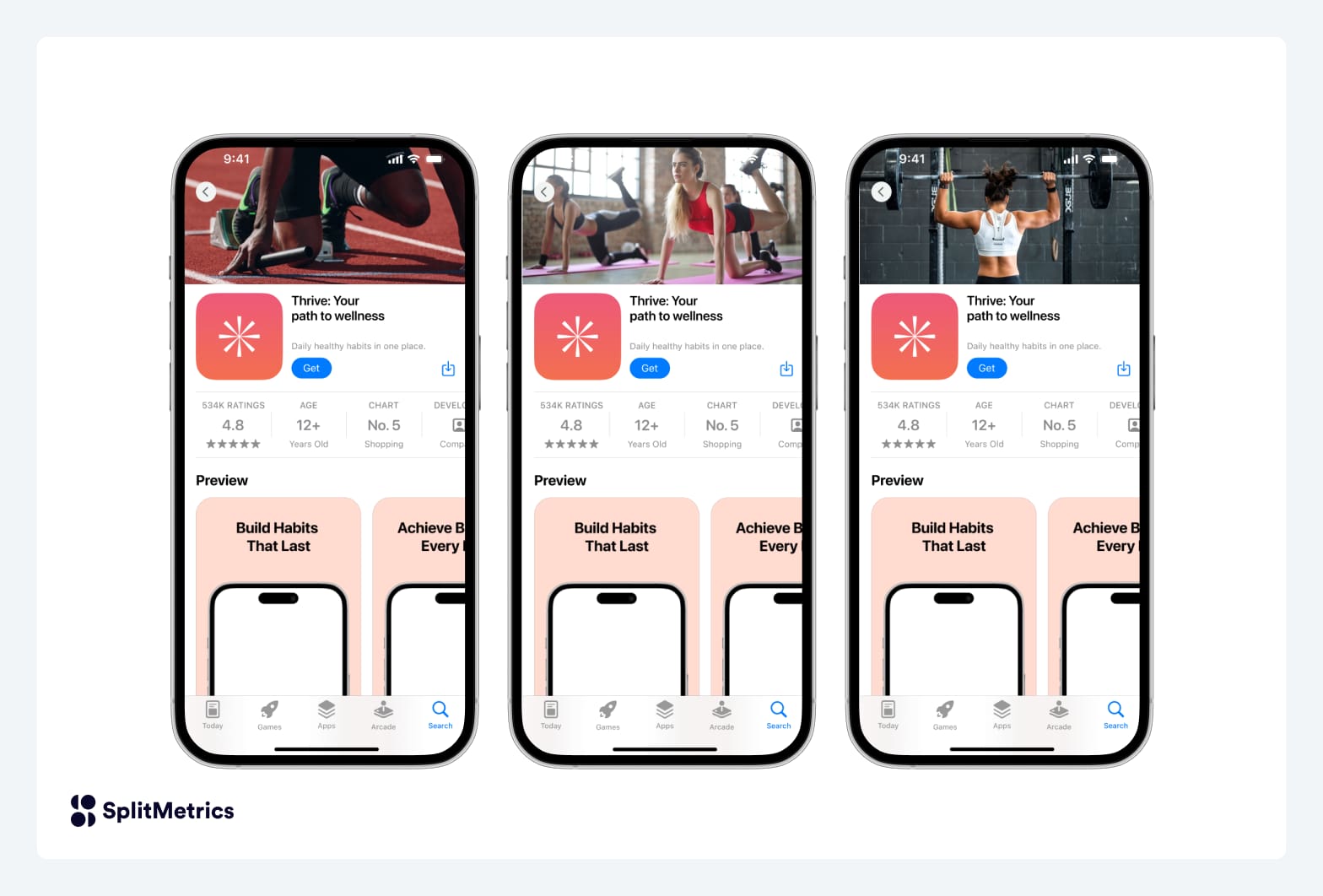
In the header you can highlight promotions, seasonal offerings, new app content launches, and more, which in our reading gives the screenshots room to go back to showing the app working.
App Store Creative Assets: How the New App Store Feature Impacts App Visibility

What the header changes for screenshot sequencing

App marketers built their screenshot sequencing on a page where screenshot one carried the opening message. The header now sits at the top of the page, above the screenshots section, so screenshot one is no longer the first visual someone meets.

How that sequencing holds up, weakens, or shifts toward the header stays untested until creative assets launch. What works inside a screenshot has not changed: lead with the benefit before the feature, put the strongest proof early, and keep one idea per frame.

You now have two kinds of video with different guidelines

Type of videoWhat it can showWhere it appears
App previewScreen captures of the app itselfProduct page and App Store search results
Creative asset videoBrand, seasonal and promotional content beyond the app in useProduct page header, search results, Apple Ads search results campaigns, and App Store features including custom product pages and in-app events

Produced brand video can sit on an App Store product page header for the first time. It still can’t be an app preview, because app previews are limited to screen captures of the app itself.

Video assets are also worth testing because videos don’t necessarily work better than screenshots. Across the Apple Ads accounts SplitMetrics manages, static creatives frequently outperform video, but it often depends on the app category.

Keep keyword-bearing captions in the screenshots

Screenshot captions are the place where your keyword-bearing text already sits, and nothing about creative assets changes that. Keep those captions where they are.

How an App Store creative asset gets approved

Creative assets will follow two submission routes. The familiar one runs through the app version page: upload the assets, preview the product page, submit the version, and the assets go live when the version is released.

The preview step is a new one. It shows the header, app name, description, screenshots and search results assets together as a customer would see them, on iPhone and iPad, across orientations and languages.

Asset Library will be a centralized place in App Store Connect that holds your existing screenshots, app previews and in-app event media alongside the new creative assets, across platforms, sizes and placements. You will be able to upload creative assets directly and submit them on their own, without updating the app version and without saying where they will be used later.

Once an asset is approved, swapping it on the header or in search results will need no new submission. The asset passes review once, and after that you can put it up and take it down on those two placements as often as you like. First approval goes through the standard review, so plan the same lead time you would plan for the release of an app version.

Apple Ads reviews ad creatives separately, against Apple Ads guidelines to be published at a later date. Based on client experience at SplitMetrics, we highly recommend having two review gates instead of one – working like this ensures you build and approve ad creatives first and let the product page and search results follow.

The two systems connect in a fixed order. You create and submit the asset in App Store Connect, either alongside an app version or on its own through Asset Library. Once the asset is approved, it becomes selectable in your Apple Ads account, where you attach it to a Today tab or search results campaign and set localization, deep links and tap destinations. Apple Ads then reviews the ad itself before it runs.

Both approval processes can be automated. The App Store Connect API uploads and submits assets to Asset Library, and the Apple Ads Platform API handles ad setup, with open-source client libraries for Swift among others. That matters most for apps running creative across a lot of countries and regions.

What the App Store asset best practices ask you to avoid

The App Store asset best practices reflect App Store policies and how artwork is evaluated for featuring. Make sure that anything you produce follows the general guidance:

  • Every asset meets a 4+ age rating, whatever the app’s own rating
  • No specific pricing, discounts, website URLs or copyright symbols
  • No claims that cannot be verified, including awards the app has not received
  • No logos or references to other platforms or app marketplaces
  • No editorial recognitions such as Editor’s Choice or App of the Day, which the App Store displays itself
  • Games with violence may use action imagery while avoiding gore and weapons pointed at a person

How creative assets fit different app categories

Every category can use creative assets. What differs is where we would start, and that depends on what an app does and on its business model. The table below is our own strategic read, not App Store guidance.

CategoryWhat changes
Games, sports, entertainment, retail, travelThe clearest use. Frequent launches, live events and seasonal demand give these apps something specific to say that a screenshot has no room for.
Finance, gambling, health, pharmaApp Store assets usually need to clear legal review first, so the internal review sets the pace rather than the App Store review.
Utility, productivity, B2BThe header has to lead with the specific job the app does. Someone looking for an invoice scanner wants to see the task completed.
Subscription businessesThe App Store shows retention and average proceeds per paying user per custom product page in App Analytics, so the effect of a header can be read past the install.
Children’s apps and sensitive categoriesEvery asset meets a 4+ age rating regardless of the app’s own rating, and imagery and claims get more scrutiny.

What else should you know about App Store creative assets?

What is the difference between a creative asset and a screenshot on the App Store?

An App Store screenshot shows the app in use, while a creative asset covers brand messaging, seasonal offerings and new content that goes beyond the app in use. Screenshots and app previews keep their existing requirements.

When do App Store creative assets launch?

App Store creative assets will arrive with iOS 27 and iPadOS 27 in the fall of 2026, together with Asset Library and the product page preview tool in App Store Connect. The exact publish date is still not set.

Do you have to create a creative asset for App Store search results?

Creating a search results creative asset is optional. If an app marketer supplies none, the existing eligible search-result media appears instead: in-app events, app previews and screenshots.

Does a creative asset need approval every time you change it?

A creative asset does not need a new approval every time you change it. Once an asset has passed review, swapping it on your product page header or in search results needs no new submission. The first approval still goes through review in the usual way, either alongside an app version or on its own through Asset Library.

Can you A/B test an App Store product page header?

You can A/B test an App Store product page header. Product page optimization will let you test alternative header visuals against your current page, and suggests testing your app’s logo, its core value, or a new feature. Product page optimization runs up to 3 treatments against the original, one test at a time, for up to 90 days.

What creative assets bring, in short

App Store creative assets launch with iOS 27 and iPadOS 27 in the fall of 2026.

  • Creative assets are their own category of App Store creative, covering brand, seasonal offerings and new content. They are the first App Store creative that doesn’t have to show the app in use.
  • Creative assets appear in product page headers, search results and Apple Ads campaigns, and can be used across App Store features you already run. Supplying one for search results is optional.
  • A product page header sits at the top of the page alongside the app icon, title and ratings, and each of your custom product pages will be able to carry its own.
  • Screenshots continue to follow existing guidelines and stay focused on demonstrating the core app experience.
  • Produced brand video can sit on a product page for the first time, built from published design templates with seamless looping. The 3:2 ratio and 5 to 30 second length apply to Apple Ads search results campaigns.
  • Approved assets don’t need a new submission to go up or come down on your product page header or in search results. First approval takes the same lead time as an app version, and Apple Ads will still review and approve your ad creatives separately.
  • Asset Library keeps your screenshots, app previews, in-app event media and creative assets in one place, and both it and Apple Ads can be driven through an API.

Knowing what changed is not the same as being ready for it. The next article will cover what to audit, what to produce, and how far ahead to start.

Share this article
Ivan Žgela
Ivan Žgela
SEO & Lead Content Manager
Leads organic growth strategy across the SplitMetrics and App Radar brands. With 10+ years in SEO, content marketing and mobile app industry, he specializes in turning technical app growth topics into search-driven content that reaches mobile marketers, UA managers, and growth teams.
Read all articles
Apple Ads Optimization
Cut CPA by 50% and double campaign ROAS with our free AI-powered automation solution.
Create Free Account
Share this article
{ "@context": "https://schema.org", "@graph": [ { "@type": "Article", "@id": "https://splitmetrics.com/blog/app-store-creative-assets/#article", "headline": "App Store creative assets: how the new App Store feature impacts app visibility", "description": "App Store creative assets are a new category of images and videos arriving with iOS 27. Where they appear, what changes for screenshots, how approval works.", "inLanguage": "en-US", "datePublished": "2026-09-18", "dateModified": "2026-09-18", "mainEntityOfPage": { "@type": "WebPage", "@id": "https://splitmetrics.com/blog/app-store-creative-assets/" }, "author": { "@id": "https://splitmetrics.com/blog/author/ivan-zgela/#author" }, "publisher": { "@id": "https://splitmetrics.com/#organization" }, "about": [ { "@id": "https://splitmetrics.com/#app-store-creative-assets" }, { "@id": "https://splitmetrics.com/#product-page-header" } ], "mentions": [ { "@id": "https://splitmetrics.com/#creative-asset-placements" }, { "@id": "https://splitmetrics.com/#creative-asset-video" }, { "@id": "https://splitmetrics.com/#app-store-search-results" }, { "@id": "https://splitmetrics.com/#asset-library" }, { "@id": "https://splitmetrics.com/#product-page-optimization" }, { "@id": "https://splitmetrics.com/#app-preview" }, { "@id": "https://splitmetrics.com/#app-store-screenshots" }, { "@id": "https://splitmetrics.com/#app-store-asset-best-practices" }, { "@id": "https://splitmetrics.com/#app-review-guidelines" }, { "@id": "https://splitmetrics.com/#app-store-connect" }, { "@id": "https://splitmetrics.com/#cpp" }, { "@id": "https://splitmetrics.com/#in-app-events" }, { "@id": "https://splitmetrics.com/#aso" }, { "@id": "https://splitmetrics.com/#search-results-ads" }, { "@id": "https://splitmetrics.com/#today-tab-ads" }, { "@id": "https://splitmetrics.com/#app-store" }, { "@id": "https://splitmetrics.com/#apple-ads" }, { "@id": "https://splitmetrics.com/#apple" }, { "@id": "https://splitmetrics.com/#ios-27" }, { "@id": "https://splitmetrics.com/#apple-games-app" }, { "@id": "https://splitmetrics.com/optimize/#software" } ], "hasPart": { "@type": "FAQPage", "@id": "https://splitmetrics.com/blog/app-store-creative-assets/#faq", "isPartOf": { "@id": "https://splitmetrics.com/blog/app-store-creative-assets/#article" }, "name": "What else should you know about App Store creative assets?", "mainEntity": [ { "@type": "Question", "@id": "https://splitmetrics.com/blog/app-store-creative-assets/#faq-1", "name": "What is the difference between a creative asset and a screenshot on the App Store?", "acceptedAnswer": { "@type": "Answer", "text": "An App Store screenshot shows the app in use, while a creative asset covers brand messaging, seasonal offerings and new content that goes beyond the app in use. Screenshots and app previews keep their existing requirements." } }, { "@type": "Question", "@id": "https://splitmetrics.com/blog/app-store-creative-assets/#faq-2", "name": "When do App Store creative assets launch?", "acceptedAnswer": { "@type": "Answer", "text": "App Store creative assets will arrive with iOS 27 and iPadOS 27 in the fall of 2026, together with Asset Library and the product page preview tool in App Store Connect. The exact publish date is still not set." } }, { "@type": "Question", "@id": "https://splitmetrics.com/blog/app-store-creative-assets/#faq-3", "name": "Do you have to create a creative asset for App Store search results?", "acceptedAnswer": { "@type": "Answer", "text": "Creating a search results creative asset is optional. If an app marketer supplies none, the existing eligible search-result media appears instead: in-app events, app previews and screenshots." } }, { "@type": "Question", "@id": "https://splitmetrics.com/blog/app-store-creative-assets/#faq-4", "name": "Does a creative asset need approval every time you change it?", "acceptedAnswer": { "@type": "Answer", "text": "A creative asset does not need a new approval every time you change it. Once an asset has passed review, swapping it on your product page header or in search results needs no new submission. The first approval still goes through review in the usual way, either alongside an app version or on its own through Asset Library." } }, { "@type": "Question", "@id": "https://splitmetrics.com/blog/app-store-creative-assets/#faq-5", "name": "Can you A/B test an App Store product page header?", "acceptedAnswer": { "@type": "Answer", "text": "You can A/B test an App Store product page header. Product page optimization will let you test alternative header visuals against your current page, and suggests testing your app's logo, its core value, or a new feature. Product page optimization runs up to 3 treatments against the original, one test at a time, for up to 90 days." } } ] } }, { "@type": "Organization", "@id": "https://splitmetrics.com/#organization", "name": "SplitMetrics", "legalName": "SplitMetrics, Inc.", "url": "https://splitmetrics.com/", "sameAs": [ "https://www.linkedin.com/company/6379927", "https://www.crunchbase.com/organization/split-metrics", "https://www.g2.com/sellers/splitmetrics-inc", "https://www.facebook.com/splitmetrics", "https://twitter.com/splitmetrics", "https://www.youtube.com/channel/UCPcUvTk791dYPDeVVlpveGg" ] }, { "@type": "Person", "@id": "https://splitmetrics.com/blog/author/ivan-zgela/#author", "name": "Ivan Žgela", "jobTitle": "SEO & Lead Content Manager", "worksFor": { "@id": "https://splitmetrics.com/#organization" }, "sameAs": ["https://www.linkedin.com/in/ivanzgela/"] }, { "@type": "DefinedTerm", "@id": "https://splitmetrics.com/#app-store-creative-assets", "name": "App Store creative assets", "description": "A category of App Store images and videos covering brand messaging, seasonal offerings and new app content. Creative assets are the first App Store creative that does not have to show the app in use, and they complement rather than replace screenshots and app previews. They appear in product page headers, App Store search results and Apple Ads campaigns, and arrive with iOS 27 and iPadOS 27 in the fall of 2026." }, { "@type": "DefinedTerm", "@id": "https://splitmetrics.com/#creative-asset-video", "name": "creative asset video", "description": "A video creative asset carrying brand, seasonal and promotional content beyond the app in use. It can sit on an App Store product page header for the first time, and appears in search results, Apple Ads search results campaigns, and App Store features including custom product pages and in-app events. It is not an app preview, because app previews are limited to screen captures of the app itself.", "isPartOf": { "@id": "https://splitmetrics.com/#app-store-creative-assets" } }, { "@type": "DefinedTerm", "@id": "https://splitmetrics.com/#product-page-header", "name": "product page header", "description": "The first visual element someone sees on an App Store product page. The header sits at the top of the page and forms the initial visual impression alongside the app icon, the title and the ratings, while the screenshots appear in their own dedicated section below. It accepts either an image or a video, and each custom product page can carry its own.", "inDefinedTermSet": { "@id": "https://splitmetrics.com/#creative-asset-placements" } }, { "@type": "DefinedTerm", "@id": "https://splitmetrics.com/#app-store-search-results", "name": "App Store search results creative asset", "description": "An optional creative asset supplied for an app's position in organic App Store search results and in the Apple Games app. If none is supplied, the media already eligible to appear there shows instead: in-app events, app previews and screenshots. App Store search results can lead straight to an install without a product page visit.", "inDefinedTermSet": { "@id": "https://splitmetrics.com/#creative-asset-placements" } }, { "@type": "DefinedTermSet", "@id": "https://splitmetrics.com/#creative-asset-placements", "name": "App Store creative asset placements", "description": "The placements where an App Store creative asset can appear.", "hasDefinedTerm": [ { "@id": "https://splitmetrics.com/#product-page-header" }, { "@id": "https://splitmetrics.com/#app-store-search-results" }, { "@id": "https://splitmetrics.com/#today-tab-ads" }, { "@id": "https://splitmetrics.com/#search-results-ads" } ] }, { "@type": "DefinedTerm", "@id": "https://splitmetrics.com/#asset-library", "name": "Asset Library", "description": "A centralized place in App Store Connect holding an app's existing screenshots, app previews and in-app event media alongside creative assets, across platforms, sizes and placements. Creative assets can be uploaded and submitted on their own through Asset Library, without updating the app version and without declaring where they will be used later. Arrives in the fall of 2026.", "isPartOf": { "@id": "https://splitmetrics.com/#app-store-connect" } }, { "@type": "DefinedTerm", "@id": "https://splitmetrics.com/#product-page-optimization", "name": "product page optimization", "alternateName": "PPO", "description": "Apple's native App Store testing framework for running alternative product page treatments against the current page. It runs up to 3 treatments against the original, one test at a time, for up to 90 days, and will let app marketers test alternative header visuals.", "isPartOf": { "@id": "https://splitmetrics.com/#app-store-connect" } }, { "@type": "DefinedTerm", "@id": "https://splitmetrics.com/#app-preview", "name": "app preview", "description": "A video on an App Store product page built from screen captures of the app experience, recorded on device. App previews may only use screen captures of the app itself, and appear on the product page and in App Store search results." }, { "@type": "DefinedTerm", "@id": "https://splitmetrics.com/#app-store-screenshots", "name": "App Store screenshots", "description": "Product page images that demonstrate the app in use. Text and image overlays are allowed and most App Store listings use them, but the frame underneath still shows the app in use. Screenshot captions are where an app's keyword-bearing text sits." }, { "@type": "DefinedTerm", "@id": "https://splitmetrics.com/#app-store-asset-best-practices", "name": "App Store asset best practices", "description": "Apple's published guidance on producing App Store assets, reflecting App Store policies and how artwork is evaluated for featuring. Every asset must meet a 4+ age rating whatever the app's own rating, and must avoid specific pricing, discounts, website URLs, copyright symbols, unverifiable claims, references to other platforms or app marketplaces, and editorial recognitions the App Store displays itself.", "sameAs": ["https://developer.apple.com/app-store/asset-best-practices/"] }, { "@type": "DefinedTerm", "@id": "https://splitmetrics.com/#app-review-guidelines", "name": "App Review Guidelines", "description": "Apple's review criteria for App Store submissions. The guidelines state that screenshots should show the app in use, and that app previews may only use screen captures of the app itself.", "sameAs": ["https://developer.apple.com/app-store/review/guidelines/"] }, { "@type": "SoftwareApplication", "@id": "https://splitmetrics.com/#ios-27", "name": "iOS 27", "applicationCategory": "OperatingSystem", "operatingSystem": "iOS", "provider": { "@id": "https://splitmetrics.com/#apple" }, "description": "The iOS release that introduces App Store creative assets, alongside iPadOS 27, in the fall of 2026.", "sameAs": ["https://en.wikipedia.org/wiki/IOS_27"] }, { "@type": "SoftwareApplication", "@id": "https://splitmetrics.com/#apple-games-app", "name": "Apple Games", "applicationCategory": "EntertainmentApplication", "operatingSystem": "iOS", "provider": { "@id": "https://splitmetrics.com/#apple" }, "description": "Apple's games destination app, one of the surfaces where App Store search results carry creative assets." }, { "@type": "Organization", "@id": "https://splitmetrics.com/#apple", "name": "Apple Inc.", "sameAs": [ "https://en.wikipedia.org/wiki/Apple_Inc.", "https://www.wikidata.org/wiki/Q312" ] }, { "@type": "SoftwareApplication", "@id": "https://splitmetrics.com/#app-store", "name": "App Store", "applicationCategory": "App Marketplace", "operatingSystem": "iOS", "publisher": { "@id": "https://splitmetrics.com/#apple" }, "sameAs": ["https://en.wikipedia.org/wiki/App_Store_(Apple)"] }, { "@type": "SoftwareApplication", "@id": "https://splitmetrics.com/#apple-ads", "name": "Apple Ads", "alternateName": "Apple Search Ads", "applicationCategory": "AdvertisingApplication", "operatingSystem": "iOS", "provider": { "@id": "https://splitmetrics.com/#apple" }, "description": "Apple's advertising platform within the App Store, offering four ad placements across the app discovery journey.", "sameAs": ["https://ads.apple.com/"] }, { "@type": "SoftwareApplication", "@id": "https://splitmetrics.com/optimize/#software", "name": "SplitMetrics Optimize", "applicationCategory": "BusinessApplication", "operatingSystem": "Web", "provider": { "@id": "https://splitmetrics.com/#organization" }, "description": "Mobile A/B testing platform for app store creatives and product pages.", "offers": { "@type": "Offer", "price": "0", "priceCurrency": "USD" } }, { "@type": "DefinedTerm", "@id": "https://splitmetrics.com/#app-store-connect", "name": "App Store Connect", "description": "Apple's developer console for publishing apps, running product page optimization tests, and accessing first-party App Store search and performance data." }, { "@type": "DefinedTerm", "@id": "https://splitmetrics.com/#cpp", "name": "custom product pages", "description": "Additional versions of an app's default App Store product page, set up in App Store Connect. The App Store allows up to 70 per app, each with its own URL, and each will be able to carry its own header." }, { "@type": "DefinedTerm", "@id": "https://splitmetrics.com/#in-app-events", "name": "in-app events", "description": "Timely App Store events that surface a large event card in search results, amplifying an app's organic listing and re-engaging existing users." }, { "@type": "DefinedTerm", "@id": "https://splitmetrics.com/#aso", "name": "App Store Optimization", "alternateName": "ASO", "description": "Optimizing app product-page assets to improve conversion rates; the foundation of successful Apple Ads campaigns." }, { "@type": "DefinedTerm", "@id": "https://splitmetrics.com/#search-results-ads", "name": "search results ads", "description": "Highest-intent Apple Ads placement, shown after a query; since March 2026 up to two ads can appear per query.", "inDefinedTermSet": { "@id": "https://splitmetrics.com/#apple-ads-placements" } }, { "@type": "DefinedTerm", "@id": "https://splitmetrics.com/#today-tab-ads", "name": "Today tab ads", "description": "Front-page browsing Apple Ads placement; requires a custom product page as source and destination.", "inDefinedTermSet": { "@id": "https://splitmetrics.com/#apple-ads-placements" } }, { "@type": "DefinedTermSet", "@id": "https://splitmetrics.com/#apple-ads-placements", "name": "Apple Ads placements", "hasDefinedTerm": [ { "@id": "https://splitmetrics.com/#search-results-ads" }, { "@id": "https://splitmetrics.com/#today-tab-ads" } ] } ] }